
Every booking in one view
Confirmed stays, owner weeks, maintenance days: everything on one screen, colour-coded by calendar.
Vacation Rental Calendar
See every booking, blocked date and gap at a glance - for the entire year. No more double bookings, no spreadsheet chaos, no more “is it free in August?” emails.
Free plan, no time limit. No card needed. The template is included.

The Rental Availability Calendar template with an example year - open it in the demo, no account needed. After sign-up it is in your account, ready for your own bookings.Swipe sideways through the year. The Rental Availability Calendar template with an example year - open it in the demo, no account needed. After sign-up it is in your account, ready for your own bookings.
Sound familiar?
One booking in your inbox, one in the spreadsheet, one only in your head. It works - until two guests book the same week.
Every inquiry means checking your list and writing back. Your availability lives where nobody else can see it.
Which weeks are still empty in July? A booking list can’t show you that - a year view can.
Mark bookings, owner stays and blocked dates in one year view, one colour per kind. Gaps and free weeks stand out instantly - so you fill them instead of finding them too late.

May to September of the example year: every booking, two inquiries for weeks that are already taken - and the free weeks in between.
What makes the difference
Confirmed stays, owner weeks, maintenance days: everything on one screen, colour-coded by calendar.
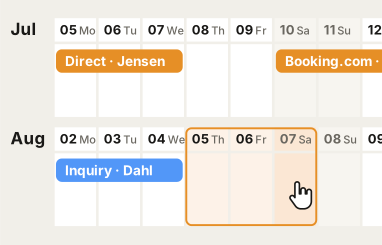
Drag across the days and the stay is marked. A booking changes? Just move it.
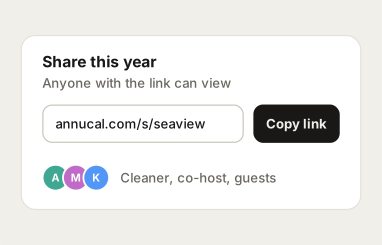
Share your calendar so guests, co-hosts or your cleaner always see the current status - without another phone call.
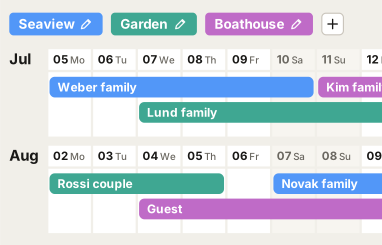
One calendar per apartment, one colour each - every year view stays readable, however many units you manage.
How it works
Step 1
Sign up and load the Rental Availability Calendar with one click. The full year is in front of you immediately - no setup.
Step 2
Drag existing bookings, owner stays and blocked dates into the year.
Step 3
Share the calendar and spot every gap worth filling - all year long.
What hosts say
People in over 100 countries plan their year with AnnuCal.
“I spotted two empty weeks in high season the day I set it up - both booked out since.”
“My cleaner and I look at the same calendar now. The back-and-forth just stopped.”
Yes. The Rental Availability Calendar is a free template, and Free keeps one year with three calendars for as long as you like - no card needed. Every account starts with 30 days of Pro; Pro adds unlimited year plans and calendars, the Timeline and Google, Outlook and Apple in both directions (€99 a year or €12.90 a month).
Yes. Sign up, load the template with one click, and it is in your account - the three calendars, the colours and the example bookings included. Replace the examples with your own bookings and you are set.
Yes. Give each property its own calendar in its own colour and keep all of them in one year view. Free includes three calendars; Pro has unlimited calendars and year plans, so you can also keep one year plan per property.
Yes. Share your year by link - read-only - and everyone sees the current state: guests who ask about a date, co-hosts, your cleaner. With Pro, up to two people can also edit the calendar with you.
No. AnnuCal is an independent year planner, not a channel manager. You mark bookings yourself - and get the one clear view across all channels that no single portal shows you.
Yes. AnnuCal runs in the browser and works on iPhone and Android - your calendar is with you everywhere.
Open the free template in the demo, move a few bookings around and see where the gaps are. No account needed until you want to keep it.