Changelog March 2026: Share Year View, Weekend View and Fade Past Events
AnnuCal now lets you share your full Year View with a simple link, introduces Weekend View, and adds Fade Past Events for a calmer, clearer yearly overview.
·
Version 1.4.5
What’s New
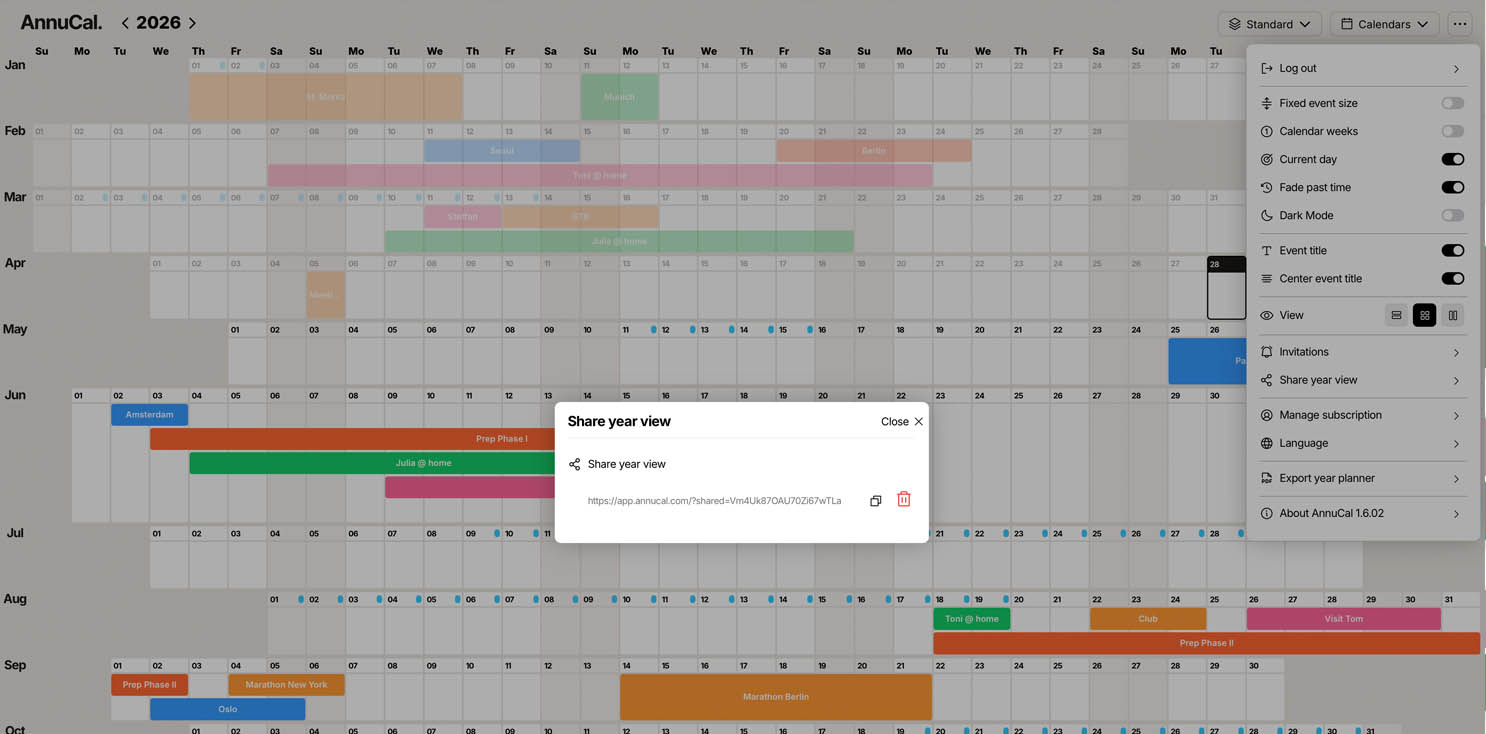
Share your full Year View with a simple link
Let others view your yearly plan without giving edit access
New Weekend View for clearer weekly and weekend-based planning
New Fade Past Events option for a calmer Year View
Better visibility of upcoming plans, routines, trips, and already completed periods
A clearer way to plan, understand, and share the structure of your year
Share Year View
AnnuCal now makes it easier to share the bigger picture.
With Share Year View, you can create a link to your full yearly overview and share it with others - without sending screenshots, exports, or manually explaining your plan.
You can use it to share:
Personal yearly plans with family or friends
Travel and vacation structures
Long-term planning with partners or collaborators
Project timelines and important phases
A clear overview of how your year is structured
The shared Year View is designed for visibility, not complexity.
Others can understand the structure of your year at a glance, without needing to edit your plan or manage calendar permissions.
No screenshots.
No back-and-forth explanations.
Just one clear view of the year.
Weekend View
We also introduced Weekend View, a new perspective for planning around the rhythm of your weeks.
While the full Year View helps you understand long-term structure, Weekend View makes weekly patterns and weekends easier to recognize.
It is especially useful for:
Weekend trips
Family plans
Recurring personal routines
Events that mostly happen outside the workweek
Seeing how much open weekend time remains across the year
Instead of treating every day the same, Weekend View highlights the rhythm many people actually plan around: the difference between weekdays and weekends.
This makes it easier to see when your year is full, when it still has space, and where important personal time is concentrated.
Fade Past Events
We also added Fade Past Events.
With this option, past events are visually softened in the Year View instead of staying just as prominent as current or upcoming events.
This helps you focus more clearly on what is still ahead, without removing what has already happened.
In a yearly overview, this becomes especially useful over time. As the year fills up, past events can create a lot of visual noise. Fade Past Events keeps the structure visible, while making the overall view calmer and easier to read.
You can use it when you want to:
Focus more clearly on upcoming plans
Reduce visual noise in your Year View
Keep past events visible without letting them dominate the screen
Better understand what is still ahead in your year
Make long-term plans easier to scan at a glance
The past remains visible.
But it moves into the background.
This makes the Year View clearer, especially as the year progresses.
Why This Matters
Long-term planning is not only about adding events.
It is about understanding structure, seeing patterns, and keeping your attention on what matters next.
With Share Year View, AnnuCal becomes easier to use together with others.
With Weekend View, your year becomes easier to read from a personal and practical perspective.
With Fade Past Events, your yearly overview stays calmer and clearer over time.
Together, these updates make AnnuCal more useful for planning real life across weeks, months, and the full year.
You can now plan, recognize, and share the structure of your year with more clarity.
👉 Try it now: annucal.com