Pricing

Start free.
Plan more with Pro.

Every new account starts with 30 days of Pro - no card needed. After that, Free keeps your year on one screen, and Pro is there when you plan more.

Free

€0

Free, for as long as you like.

One year on one screen - for everyone who wants to see the whole year at a glance.

Start free

No card. Starts with 30 days of Pro, like every account.

Includes

  • 1 year plan with 3 calendars
  • All three layouts: linear, weekend, vertical
  • Public holidays
  • Google Calendar import, one-way
  • Orbit, and the Timeline with your calendars
  • Share by link and invite viewers
  • 20 colours, dark mode, all display options
  • One template to start from

Pro

Recommended

€8.25 / month

€99 a year, billed yearly

All of AnnuCal: plan your year on your own or with up to two others - and show it to anyone you like.

Try Pro free for 30 days

No card needed. Keep Pro on day 31, or stay on Free.

Everything in Free, plus

  • Unlimited year plans and calendars
  • Timeline: projects, phases, milestones
  • Google Calendar in both directions
  • School holidays
  • Your own colours
  • All templates
  • PDF export
  • Unlimited viewers and 2 editors
  • Priority support

Pro is €99 a year or €12.90 a month, VAT included. Cancel anytime - your plan stays.

  • No card to start
  • Nothing is deleted on day 31
  • Cancel in the app, anytime
  • Made in Germany, no cookies

What Pro adds

Three things you plan with in Pro.

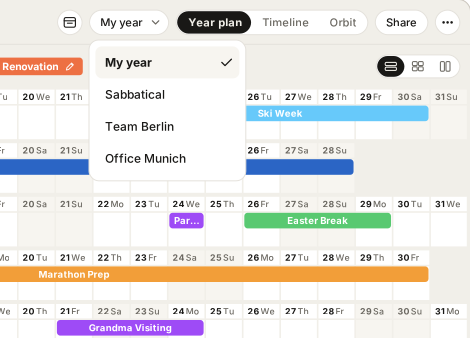
As many year plans as you like

The real year, a sabbatical, a team, an office - the same months, each planned on its own, and you switch between them.

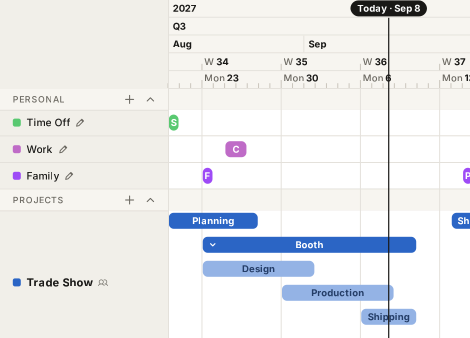
Projects on the timeline

Phases as bars, milestones as points, your calendars running above them.

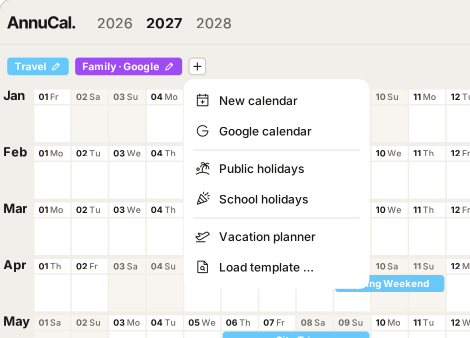
Google Calendar, both ways

What you add in AnnuCal appears in Google, and the other way round.

Compare

Free and Pro in detail

Free is a year at a glance. Pro is everything that plans beyond it.

Feature Free €0 Start free Pro €8.25 / month Try Pro free
Planning
Year plans A complete year with its calendars and entries - a scenario in the app 1Unlimited
Calendars per year plan 3Unlimited
Entries UnlimitedUnlimited
Templates Ready-made years for travel, family, a season or a business year 1All
Views
Year planner Linear, weekend or vertical layout Included Included
Display options Compact or blocks, tinted colours, calendar weeks, dark mode Included Included
Timeline with your calendars Your calendars as rows, from a week to several years Included Included
Projects on the timeline Phases as bars, nested when you want, milestones as points View only Included
Orbit The year as a ring, with last year inside it Included Included
Calendars
Public holidays Included Included
School holidays Not included Included
Google Calendar import Your Google events in your year, read-only Included Included
Google Calendar both ways What you add in AnnuCal appears in Google, too Not included Included
Colours Twenty from the palette; Pro adds your own 2020 + your own
Sharing
Share by link Also embeds on a website Included Included
Viewers People who can look at your year UnlimitedUnlimited
Editors People who plan in your year with you Not included 2, plus you
Extras
PDF export Not included Included
Priority support Not included Included

30 days of Pro

Every account starts with everything.

  1. Day 1

    Sign up, no card.

    You get all of Pro from the first minute: unlimited plans, the Timeline, Google Calendar in both directions.

  2. Days 1-30

    Plan with everything.

    Decide whenever you like. If you keep Pro during the trial, you add a card then - the first charge comes on day 31, not earlier.

  3. Day 31

    Keep Pro, or stay on Free.

    Nothing is deleted. What goes beyond Free stays visible, read-only, and opens again with an upgrade.

FAQ

Questions about Free and Pro

Short answers, no marketing. If something is missing, write to us.

Is AnnuCal really free?

Yes. Free gives you one year plan with three calendars, all three layouts, public holidays, a one-way Google Calendar import and sharing by link - for as long as you like, no card, no time limit.

What is a year plan?

A year plan is one complete year: its calendars and entries. In the app it is called a scenario. Free has one; with Pro you keep as many as you like - the real year, a sabbatical, a team, an office - the same months, each planned on its own - and switch between them.

What happens after the 30 days?

On day 31 your account continues on Free unless you keep Pro. Nothing is deleted: your year plan stays editable, and everything beyond Free - extra calendars, extra plans, projects on the timeline - stays visible, read-only. Upgrade later and it all opens again.

Do I need a card to start?

No. Every account starts without one. If you decide to keep Pro during the 30 days, you add a card then, and the first charge comes on day 31 - not earlier.

How do I cancel?

Anytime, in the app under Account - Manage subscription. Pro runs until the end of the period you paid for, then your account continues on Free. Your plan stays.

Is Pro for teams?

Pro is for you and up to two others - your partner and your assistant, say. They plan in your year with you, and anyone else can view it. The people you invite do not need Pro themselves.

I am already on Personal Pro. What changes for me?

Nothing you need to do. You keep your current price for as long as your subscription runs, and you get everything in Pro - Timeline, Orbit and Google Calendar in both directions included.

Which currency will I pay in?

In euros, VAT included. Customers in the US pay in US dollars: $99 a year or $12.90 a month.

Start with the year.

Open the demo first, or sign up and start with 30 days of Pro. No card needed either way.