Linear calendar

The linear calendar: your whole year on one line

Every day of the year in one view - months as rows, every day a column, your plans as bars with a visible length. Build one on paper or a whiteboard, or plan in one: AnnuCal is a linear calendar app.

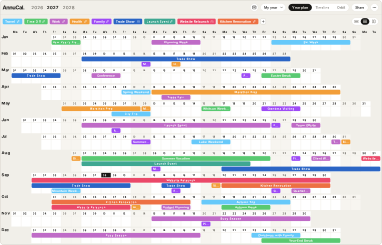
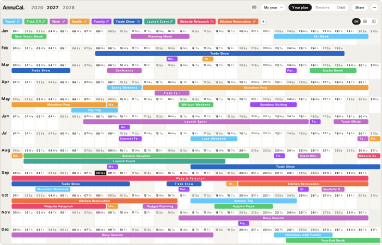
AnnuCal year planner with the demo year 2027 as a linear calendar with aligned weekdays: twelve months as rows, every weekend running down the year as a column; trips, time off, work, health, family plans and four projects as coloured bars.

The demo year in AnnuCal, aligned by weekday.The demo year in AnnuCal.

What a linear calendar is

A linear calendar lays the whole year out as one continuous strip of time instead of pages: the twelve months as rows, one under the other, every day a column - 1 January top left, 31 December bottom right, everything in between visible at once. Some versions align the days by date, some by weekday, some turn the whole thing on its side; the three layouts are below.

The ordinary calendar does the opposite: a grid calendar gives each month its own page, and an app shows a day, a week or a month and keeps the rest behind a scroll. The linear calendar keeps the year in one piece - that is the whole idea. A plan is no longer a note on a day but a bar with a length, and the year is a line you can read from end to end.

The idea is not new. In Germany the year on one sheet has hung in offices for decades as the wall planner, and Roman walls carried the whole year in columns two thousand years ago. What is new is the name - and that you can now plan in one instead of just looking at it.

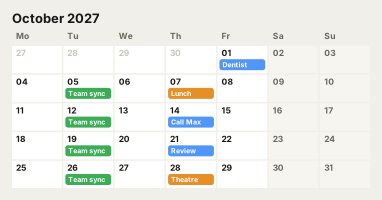
A calendar app's month view: October 2027 as a grid of days with a few appointments.
A grid calendar: one month per page.
Year planner: twelve months on one screen.
A linear calendar: the whole year on one surface.

Why it works

Three things happen when the whole year is in front of you.

You see the shape of your year.

Trips, launches, busy seasons and the quiet weeks between them stand out as clusters and gaps. A crowded stretch with no recovery after it shows up months before it arrives.

You plan in seasons, not weeks.

A week view asks what you do on Tuesday. A year on one line asks when the big things happen and how much room is around them - a question a week view cannot show.

Everything is in one picture.

Work and life stop running in separate systems: the conference and the school holidays, the launch and the wedding, side by side. Collisions are visible before they are booked.

How to set up a linear calendar

The same four steps work on paper, on a whiteboard and in an app.

  1. Step 1

    Fixed dates first

    Birthdays, anniversaries, public holidays, school holidays, the trips you already know. Longer ones as ranges, not dots.

  2. Step 2

    Then the work

    Deadlines, launches, conferences, the busy season. Each kind in its own colour, so work and life can be told apart at a glance.

  3. Step 3

    Then what runs for months

    Training for a race, a renovation, a big project without a hard end: a long bar. This is what the year is actually about - and what no week view ever shows.

  4. Step 4

    Read it, then move things

    Where do bars pile up? Where is a free stretch? What collides? Shift what can be shifted - and look again every few weeks.

AnnuCal’s templates take the first steps off your hands: a ready-made year for a family, a founder, a season, time off or a rental, with the fixed dates and the typical stretches already in place.

Three ways to build one

Which one fits depends on whether you want to look at the year or work in it.

Whiteboard or notes

A Miro board, a canvas in your notes app, a table with one row per month. Free-form and quick to start; for Obsidian there are community plugins that draw the year from the dates in your notes. You draw and maintain it by hand, and your appointments stay elsewhere.

Paper

A printed strip, a poster, the wall planner in the office: always in view, no screen, the whole family sees it. Pencil for what might still move, pen for what won’t. Nothing can be dragged once it is written, and next year is a new sheet.

An app

AnnuCal draws the year for you: plans are bars you drag and stretch, calendars have colours you switch on and off, your Google Calendar shows inside the year, and the year prints as a PDF when you want it on the wall. Beyond the year, the Timeline carries projects across years.

Open the demo

Three layouts, one year

AnnuCal draws the same year in all three. Pick the one your eyes already know - every plan stays where it is.

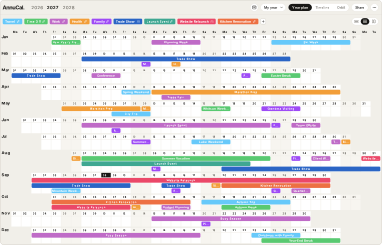
Linear layout: months as rows, days aligned by date.

Linear

Months as rows, days as columns, aligned by date - the 15th sits under the 15th all year. The layout of the German wall planner.

Weekend layout: weekdays aligned, every weekend a column down the year.

Weekend

Aligned by weekday, so every weekend runs down the year as one column. The form common in the US.

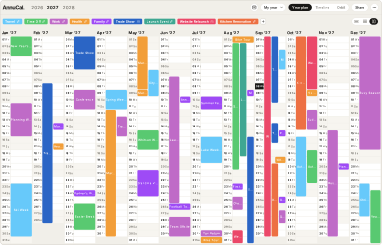
Vertical layout: months side by side, days running down.

Vertical

Months side by side, days running down. The Roman wall - and many wall planners today.

FAQ

Questions about linear calendars

Something missing? Write to us.

What is a linear calendar?

A calendar that shows the whole year as one continuous strip instead of pages - usually twelve months as rows with every day as a column - so everything from 1 January to 31 December is visible at once and plans become bars with a length.

How is a linear calendar different from a normal calendar?

A normal calendar shows a day, a week or a month at a time; a linear calendar shows the year. It is made for stretches - trips, projects, seasons - not for the next appointment. The two work together: in AnnuCal your Google Calendar shows inside the year.

Is there a linear calendar app?

Yes. AnnuCal is one: the year in three layouts, plans as bars, several calendars in colours, Google Calendar inside, and a demo that opens without an account.

How do I make a linear calendar in Obsidian or Notion?

In Obsidian, community plugins draw a linear year from the dates in your notes’ properties. In Notion or a spreadsheet, build a table with one row per month and a column per day, and colour the cells.

Can I print a linear calendar?

Yes. AnnuCal exports the year as a PDF, so the printed strip shows your own plans. The export is part of Pro; every new account starts with 30 days of Pro.

Is there a free linear calendar?

AnnuCal’s Free plan keeps one year plan with three calendars, in all three layouts, for as long as you like. Pro adds unlimited plans, the Timeline, Google Calendar both ways and the PDF export.

What about the linear calendar for the classroom?

That is a different thing with the same name: in preschools and Montessori classrooms, teachers tape one sheet per day to the wall so children can see the month pass. This page is about the linear calendar for planning a year.

See your year on one line

The demo opens a full year, no account needed. Or start from a ready-made year in the templates.