Go Back
AnnuCal vs. Google Calendar: Why a 12-Month View Changes How You Plan
Looking for a Google Calendar alternative for yearly planning? See how AnnuCal's 12-month view helps you plan an entire year at once - and why the two work best together.
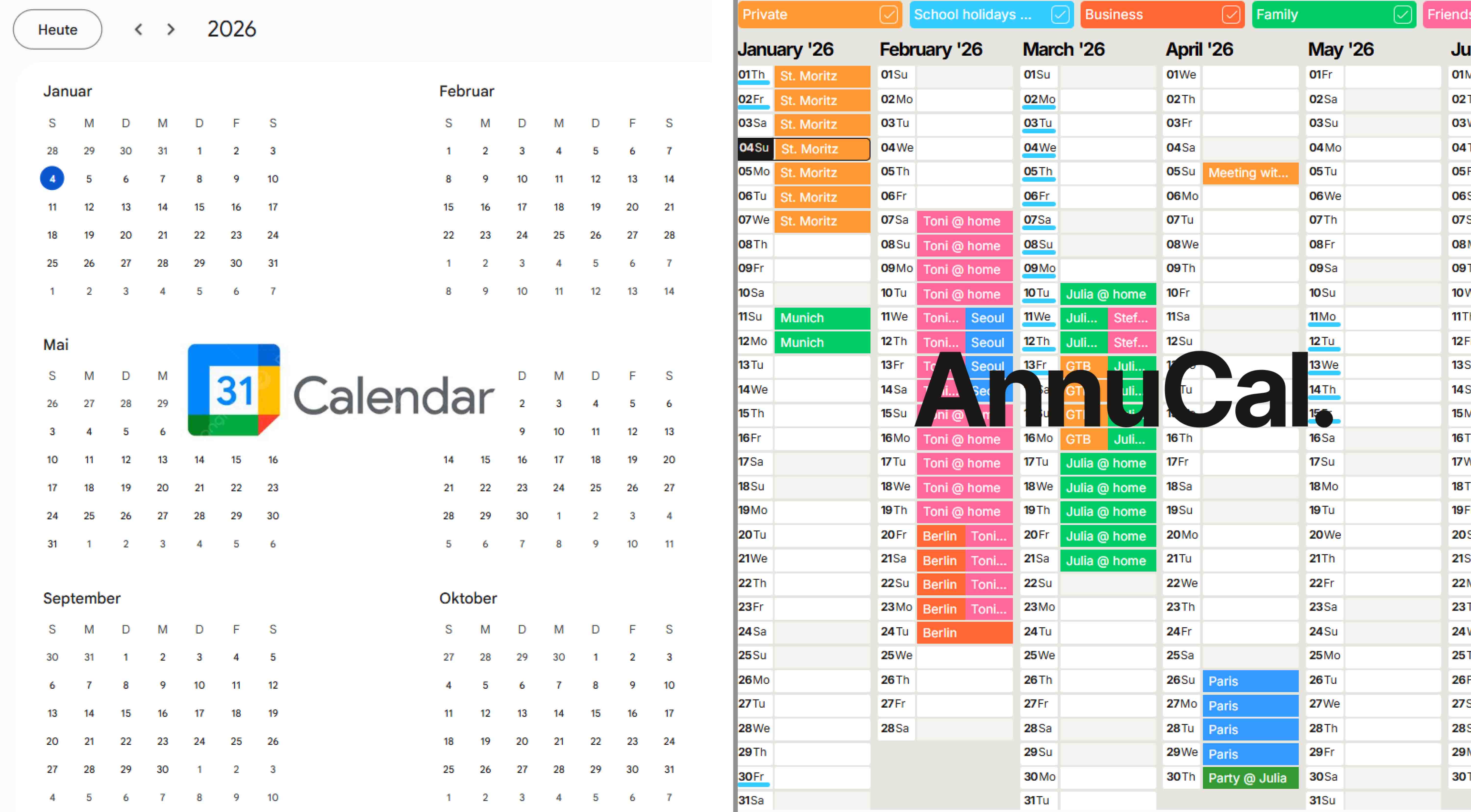
Google Calendar is built for managing your days. AnnuCal is built for planning your year. Google Calendar is excellent for meetings, reminders, and short-term scheduling, but it has no real year-at-a-glance view. AnnuCal shows all twelve months on a single screen, which makes it a strong Google Calendar alternative whenever you need to see and structure an entire year at once. The two aren't rivals, most people use Google Calendar for the day and AnnuCal for the year.
Here's the full comparison, and how to decide which one you actually need.
Google Calendar: Excellent for Scheduling, Limited for the Year
Google Calendar is one of the most widely used scheduling tools in the world, and for good reason. For day-to-day organization it works brilliantly:
Seamless integration with Gmail and Google Workspace
Reliable invitations, reminders, and notifications
Ideal for meetings, appointments, and short-term coordination
But Google Calendar was never designed for long-term planning. When you try to map out vacations, project phases, absences, or yearly goals, the experience fragments. You switch between months, scroll endlessly, and mentally stitch together what your year actually looks like.
Google Calendar does technically offer a "year" view, but it only shows the dates and which days have something on them. It doesn't lay your events out as readable blocks across the months, so it isn't a true planning overview. A genuinely readable 12-month view simply isn't what the tool was built for.
AnnuCal: Built for Year-First Planning
AnnuCal was created specifically to solve that problem.
Instead of asking "What's next on my calendar?", AnnuCal asks a different question: "What does my year look like?"
With its horizontal 12-month view, AnnuCal shows your entire year on a single screen, giving you immediate clarity about timing, duration, overlaps, and free space. Events become visual blocks stretched across the months instead of isolated dots on a grid.
Key advantages include:
12-month overview - see your entire year at a glance
Time-first planning - events as visual blocks across months, not isolated dates
Drag-and-drop flexibility - adjust plans instantly as priorities shift
Built-in context - public holidays, school breaks, and bridge days included
Easy sharing - collaborate with teams, families, or organizations
AnnuCal doesn't replace your daily calendar. It complements it by providing the long-term perspective day-and-week tools lack.
AnnuCal vs. Google Calendar: Side-by-Side
Google Calendar | AnnuCal | |
|---|---|---|
Best for | Daily and weekly scheduling | Yearly and long-term planning |
Core view | Day, week, month | Full 12 months on one screen |
Events shown as | Time slots on a grid | Visual blocks across the year |
Long-term overview | Limited - requires scrolling | Built in, at a glance |
Holidays & school breaks | Add manually or subscribe | Included by default |
Reminders & invites | Strong | Not the focus |
Best use | Manage your days | Shape your year |
The simplest way to read this table: Google Calendar helps you manage time, AnnuCal helps you understand and structure it.
When AnnuCal Is the Better Choice
AnnuCal is especially powerful whenever planning extends beyond individual days:
Families - vacations, school holidays, long weekends, shared time off
Teams & businesses - project phases, absences, deadlines, capacity planning
Personal planning - goals, milestones, recovery periods, work-life balance
Wherever you need to see how a whole year fits together, and not just what's happening tomorrow, a year-at-a-glance view does what a daily calendar can't.
You Don't Have to Choose: Use Both
This isn't really a question of switching tools. The two solve different problems.
Keep Google Calendar for what it's great at, meetings, invites, and the rhythm of your day. Use AnnuCal for the layer above it: the vacations, projects, and phases that only make sense when you can see the whole year at once.
Google Calendar for the day. AnnuCal for the year.
Frequently Asked Questions
Does Google Calendar have a yearly view? Google Calendar has a "year" view, but it only displays the dates and marks which days have entries. It doesn't show your events as readable blocks across the months, so it works as a date reference rather than a true yearly planning overview.
What's the best Google Calendar alternative for yearly planning? For planning an entire year at once, AnnuCal is purpose-built for it. Its horizontal 12-month view puts the whole year on one screen, with events shown as visual blocks, something general calendars aren't designed to do.
Can I see my whole year on one screen? Yes. AnnuCal's 12-month view shows all twelve months together, so you can spot overlaps, dense periods, and free space at a glance instead of scrolling month by month.
Do I have to stop using Google Calendar? No. AnnuCal complements Google Calendar rather than replacing it. Many people keep Google Calendar for daily scheduling and use AnnuCal for long-term, year-level planning.
Is AnnuCal free? AnnuCal offers a free plan (Personal Free) for yearly planning, plus a Personal Pro plan with more scenarios, calendars, and advanced features for users who need them.
Conclusion: Scheduling vs. Planning Your Year
Google Calendar remains a strong tool for everyday scheduling. But for annual planning, it was never the right instrument.
AnnuCal offers something fundamentally different: a calm, visual, time-first view of the entire year, designed for long-term clarity rather than short-term reminders.
If Google Calendar helps you manage your days, AnnuCal helps you shape your year.
👉 See how effortless yearly planning can feel, start free at annucal.com. Curious how this differs from a normal calendar? Here's the difference.