Timeline · Project · Pro
Film Production Schedule
From development to premiere: financing, prep, shoot, post and festivals - a whole film as one project.
- Development
- Treatment
- First draft
- Final screenplay
- Financing
- Financing closed
- Pre-production
- Casting
- Location scouting
- Crew
- Permits and insurance
- Shoot
- Studio block
- Location block
- Pick-ups
- Edit
- Music and sound
- Picture lock
- Colour grading
- Delivery
- Festivals
- Premiere
18 phases · 4 milestones · 484 days
Opens the template in the app - everything works, nothing is saved. Sign up when you want to keep it.

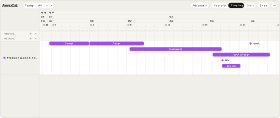
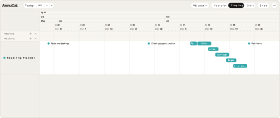
The Film Production Schedule as it arrives on your Timeline - here with the first day of shooting on 3 May 2027. Loading it adds only this project - your own calendars stay as they are. After loading, the app sets zoom and window to the span of the project.Swipe sideways through the project. The Film Production Schedule as it arrives on your Timeline - here with the first day of shooting on 3 May 2027. Loading it adds only this project - your own calendars stay as they are.
What’s inside
The phases and milestones
The template loads with exactly these dates.
- Development5 September - 2 December 2026
- Treatment5-25 September 2026
- First draft Table read · Notes from the producer28 September - 8 November 2026
- Final screenplay11 November - 2 December 2026
- Financing Funding applications · Co-production · Final budget4 November 2026 - 31 January 2027
- Financing closed1 February 2027
- Pre-production1 March - 30 April 2027
- Casting Lead roles · Supporting roles · Extras1-28 March 2027
- Location scouting8-31 March 2027
- Crew Heads of department · Crew contracts29 March - 15 April 2027
- Permits and insurance13-30 April 2027
- Shoot3 May - 11 June 2027
- Studio block3-18 May 2027
- Location block19 May - 5 June 2027
- Pick-ups8-11 June 2027
- Edit14 June - 6 August 2027
- Music and sound26 July - 3 September 2027
- Picture lock6 August 2027
- Colour grading9-27 August 2027
- Delivery10 September 2027
- Festivals20 September - 19 December 2027
- Premiere1 January 2028
Load the template with these dates
Why this template
Why use this planner?
For producers, directors and production managers who want to see the whole production at once - and the life running above it.
Try it in the demoA film is eighteen months of overlapping phases, and most of them are decided long before the first day of shooting. This schedule lays all of them out as one project: development and financing side by side, pre-production with its checklist, the shoot, then edit, music and sound and colour grading running into each other, delivery and the festival run. Everything is an offset from the first shooting day - move that date, and the whole production moves with it.
- The whole production as one project: eight phases, four milestones
- Development, financing, edit, sound and colour overlap, as they do in real life - the Timeline shows them in lanes
- Checklists for development, financing and pre-production
- Everything counted from the first day of shooting: move it, and every phase follows
- Festivals and premiere are part of the plan, not an afterthought
How it works
From template to your year in three steps
A blank year is the hardest part of planning. Starting from a proven structure - and adjusting it - is faster and easier than building from scratch. Pick the closest template, make it yours, and keep planning.
-
Step 1
Try it in the demo
Open any template in the demo and look around - no account needed.
-
Step 2
Add it to your account
Sign up and the template is yours. Every account starts with 30 days of Pro, so Pro templates work from day one.
-
Step 3
Make it your own
Rename, recolour, move, add and remove - everything stays editable.
What is the Film Production Schedule?
The Film Production Schedule is a ready-made AnnuCal timeline template: one project with eight phases and four milestones, from development to the premiere. You pick the first day of shooting, load it, and adjust every phase to your production.
Why are the phases counted from the first shooting day?
Because that is the date everything else bends around. Financing has to be closed before pre-production, the edit starts when the shoot ends, delivery and festivals follow the edit. With the shoot as the anchor, moving one date moves the whole plan - and keeps the gaps between phases intact.
Can I plan a series or a short film with it?
Yes. Shorten or delete the phases you do not need and stretch the ones you do - a short film might need three weeks of pre-production and one week of shooting. The structure stays the same.
Does it show my own time next to the production?
Yes. Your calendars - time off, family, other work - run above the project on the Timeline, so a holiday in the middle of the edit is visible before it becomes a problem.
Is this template free?
This template is a project on the Timeline, and projects are part of Pro. Every new account starts with 30 days of Pro, so you can load it right away; after the trial, Pro is €99 a year or €12.90 a month. On Free you can still try it in the demo.
Can I customize the template?
Yes. After loading, every phase and milestone is yours to move, rename, add to or delete - and you change the project’s name and colour in its panel.
More templates
Three more worth a look
Start with this template.
Open it in the demo, pick your date - and keep it as a project when you sign up. No card needed.