Timeline · Project · Pro
Product Launch Timeline
Concept, design, development, beta and the launch campaign - five months of a product launch as one project.
- Concept
- Design
- Development
- Launch campaign
- Beta
- Beta test
- Launch
5 phases · 2 milestones · 165 days
Opens the template in the app - everything works, nothing is saved. Sign up when you want to keep it.

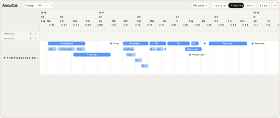
The Product Launch Timeline as it arrives on your Timeline - here with the launch day on 1 June 2027. Loading it adds only this project - your own calendars stay as they are. After loading, the app sets zoom and window to the span of the project.Swipe sideways through the project. The Product Launch Timeline as it arrives on your Timeline - here with the launch day on 1 June 2027. Loading it adds only this project - your own calendars stay as they are.
What’s inside
The phases and milestones
The template loads with exactly these dates.
- Concept2-31 January 2027
- Design1 February - 13 March 2027
- Development3 March - 10 May 2027
- Launch campaign Landing page · Press · Newsletter · Social media4 May - 15 June 2027
- Beta11 May 2027
- Beta test11-24 May 2027
- Launch1 June 2027
Load the template with these dates
Why this template
Why use this planner?
For founders, product and marketing teams who launch a product, a feature or a website - and want the road to the date on one screen.
Try it in the demoA launch date is a promise, and this template shows what has to happen before you can keep it: a month of concept, six weeks of design, development that starts before the design is finished, a beta three weeks out, and the campaign that begins four weeks before launch day and runs two weeks past it. Set the launch date, and every phase takes its place.
- Five phases and two milestones, counted back from launch day
- Design and development overlap, as they do in practice
- The campaign starts before the launch and runs past it
- A checklist for the campaign: landing page, press, newsletter, social media
- Move the launch date, and the whole plan moves with it
How it works
From template to your year in three steps
A blank year is the hardest part of planning. Starting from a proven structure - and adjusting it - is faster and easier than building from scratch. Pick the closest template, make it yours, and keep planning.
-
Step 1
Try it in the demo
Open any template in the demo and look around - no account needed.
-
Step 2
Add it to your account
Sign up and the template is yours. Every account starts with 30 days of Pro, so Pro templates work from day one.
-
Step 3
Make it your own
Rename, recolour, move, add and remove - everything stays editable.
What is the Product Launch Timeline?
The Product Launch Timeline is a ready-made AnnuCal timeline template: one project with five phases and two milestones, from the first concept to two weeks after launch. You pick the launch date, load it, and adjust the phases to your product.
What if the launch date moves?
Open the project and move the launch milestone - or drag the phases that slipped. Every phase is editable, and the Timeline shows at once what still fits before the new date.
Can I use it for a feature release or a website?
Yes. The phases are the same for a feature, a website relaunch or a campaign; only their lengths change. Shorten the concept, delete the beta if there is none, keep the campaign.
Can my team see the plan?
Yes. Share your year by link for a read-only view, or invite up to two people to edit it with you on Pro - the project is then the same for everyone.
Is this template free?
This template is a project on the Timeline, and projects are part of Pro. Every new account starts with 30 days of Pro, so you can load it right away; after the trial, Pro is €99 a year or €12.90 a month. On Free you can still try it in the demo.
Can I customize the template?
Yes. After loading, every phase and milestone is yours to move, rename, add to or delete - and you change the project’s name and colour in its panel.
More templates
Three more worth a look
Start with this template.
Open it in the demo, pick your date - and keep it as a project when you sign up. No card needed.