Year plan · Scenario · Free
Goal Year Planner
Health, money and learning goals on the days they are due - with a check-in every quarter.
- Health & Fitness
- Finances
- Goals & Learning
3 calendars · 25 example entries
Opens the template in the app - everything works, nothing is saved. Sign up when you want to keep it.

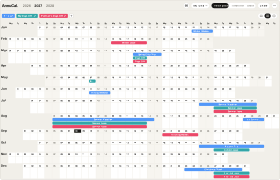
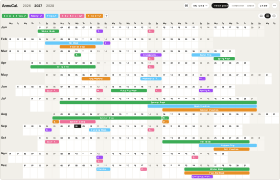
The template as it arrives in your account: 3 calendars, 25 example entries, every one of them editable.Swipe sideways through the year. The template as it arrives in your account: 3 calendars, 25 example entries, every one of them editable.
What’s inside
The calendars and their example entries
Health & Fitness
- Sign Up: Half Marathon 9 Jan
- First 5K Race 14 Mar
- 10,000 Steps a Day 1-30 Apr
- 10K Race 20 Jun
- Long Run 18 km 5 Sep
- Half Marathon 10 Oct
Finances
- Budget Weekend 2-3 Jan
- Cancel Unused Subscriptions 15 Feb
- Collect Receipts 13 Mar
- Tax Return Filed 24 Apr
- Mid-Year Money Check 1 Jul
- Decide on the Big Purchase 11 Sep
- Set Savings Rate 2028 27 Nov
Goals & Learning
- Set Goals for the Year 2-3 Jan
- Language Course Starts 18 Jan
- Photography Workshop 6-7 Mar
- Q1 Check-in 27 Mar
- Language Level Test 29 May
- Q2 Check-in 26 Jun
- Portfolio Weekend 10-11 Jul
- Digital Detox Week 9-15 Aug
- Online Course Starts 13 Sep
- Q3 Check-in 25 Sep
- Language Test B1 20 Nov
- Year Review 18 Dec
Why this template
Why use this planner?
For people who set a few goals a year and want a date on each of them, not a list.
Try it in the demoA resolution has no date, which is why it is gone by February. The Goal Year Planner gives every goal one: the race you signed up for, the test you booked, the day the tax return is due. Spread across the year with a check-in each quarter, the goals become appointments with yourself - and you see at a glance when the year gets dense.
- Three calendars: health and fitness, finances, goals and learning
- Every goal on the day it is due - a race, a test, a filed return
- Bounded challenges: one month of 10,000 steps, one week offline
- Four check-ins a year and a year review, already in the calendar
- Use the linear, vertical and weekend layouts
How it works
From template to your year in three steps
A blank year is the hardest part of planning. Starting from a proven structure - and adjusting it - is faster and easier than building from scratch. Pick the closest template, make it yours, and keep planning.
-
Step 1
Try it in the demo
Open any template in the demo and look around - no account needed.
-
Step 2
Add it to your account
Sign up and the template is yours. Every account starts with 30 days of Pro, so Pro templates work from day one.
-
Step 3
Make it your own
Rename, recolour, move, add and remove - everything stays editable.
What is the Goal Year Planner?
A ready-made AnnuCal template with three calendars - health and fitness, finances, goals and learning - in which every goal has a date. You add it to your account and swap the example goals for yours.
Why are the goals single days and not bars across months?
Because a goal you can see is a date you can miss. “Get fitter” is a wish; “half marathon on 10 October” is a plan, and the training falls into place behind it. Bars are reserved for things that really fill every day - a month of 10,000 steps, a week without screens.
What are the check-ins for?
Four Saturdays a year, one per quarter, plus a review in December. Half an hour each: which goals are on track, which date needs to move, what gets dropped. Without that moment the plan quietly stops being true.
Can I use it for other goals?
Yes. The three areas are a suggestion. Rename a calendar to “Writing”, “Garden” or “Family” and give those goals their dates the same way.
Is this template free?
Yes. You can add and use this template with a free account - Free keeps one year plan with three calendars, for as long as you like. Every account starts with 30 days of Pro; Pro adds unlimited year plans and calendars, the Timeline and Google Calendar in both directions (€99 a year or €12.90 a month).
Can I customize the template?
Yes. After you add the template to your account, you can freely change its dates, colours, calendars and entries.
More templates
Three more worth a look
Start with this template.
Open it in the demo, change what you like - and keep it when you sign up. No card needed.