Year plan · Scenario · Free
Vacation & Time-Off Planner
Trips, your days off and your partner’s on one screen - see in January where the year lines up.
- Trips
- My Days Off
- Partner's Days Off
3 calendars · 17 example entries
Opens the template in the app - everything works, nothing is saved. Sign up when you want to keep it.

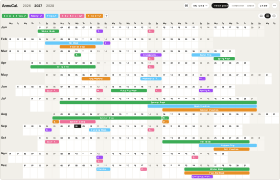
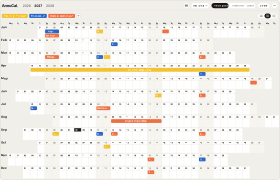
The template as it arrives in your account: 3 calendars, 17 example entries, every one of them editable.Swipe sideways through the year. The template as it arrives in your account: 3 calendars, 17 example entries, every one of them editable.
What’s inside
The calendars and their example entries
Trips
- Winter Weekend Away 22-24 Jan
- Spring City Trip 18-21 Mar
- Hiking Weekend 11-13 Jun
- Summer Vacation 24 Jul - 14 Aug
- Late Summer Weekend 27-29 Aug
- Autumn Trip 23-31 Oct
- Christmas Travel 23-30 Dec
My Days Off
- Days Off 18-19 Mar
- Bridge Day 7 May
- Summer Leave 26 Jul - 13 Aug
- Autumn Leave 25-29 Oct
- Year-End Leave 27-31 Dec
Partner's Days Off
- Winter Leave 15-19 Feb
- Days Off 18-19 Mar
- Summer Leave 26 Jul - 13 Aug
- Visiting Parents 20-24 Sep
- Year-End Leave 27-31 Dec
Why this template
Why use this planner?
For anyone who plans time off with a partner and wants to decide early where the year’s free time goes.
Try it in the demoMost vacation planning fails at one point: two people, two employers, one calendar that nobody looks at until the good weeks are gone. The Vacation & Time-Off Planner puts the trips you want to take next to the days you both can actually take - the whole year in one view, so the gap in February and the overlap in July are obvious in January.
- Three calendars: trips, your days off, your partner’s days off
- See where leave is left and where the two of you line up - before booking
- Bridge days and long weekends stand out next to the public holidays
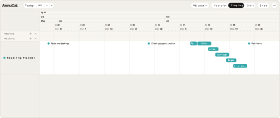
- Use the linear, vertical and weekend layouts
- Rename “Partner” to a colleague or a friend - it is your calendar
How it works
From template to your year in three steps
A blank year is the hardest part of planning. Starting from a proven structure - and adjusting it - is faster and easier than building from scratch. Pick the closest template, make it yours, and keep planning.
-
Step 1
Try it in the demo
Open any template in the demo and look around - no account needed.
-
Step 2
Add it to your account
Sign up and the template is yours. Every account starts with 30 days of Pro, so Pro templates work from day one.
-
Step 3
Make it your own
Rename, recolour, move, add and remove - everything stays editable.
What is the Vacation & Time-Off Planner?
A ready-made AnnuCal template with three calendars: the trips you plan, your own vacation days and your partner’s. You add it to your account and replace the example year with yours.
Why a calendar for my partner’s days off?
Because that is where vacation planning usually breaks. Two employers, two sets of leave - the week in February that only one of you has off, or the overlap in July you want to protect, is only visible when both are next to each other across the whole year.
Where are the public holidays?
They are a feature of the app, not part of the template: switch on the holidays of your country or region, and they appear in the year plan - the bridge days around them show up by themselves.
Can my partner fill in their own days?
Yes. Share the year plan with your partner to edit, and each of you keeps their own calendar up to date - the trips you plan together in the third one.
Is this template free?
Yes. You can add and use this template with a free account - Free keeps one year plan with three calendars, for as long as you like. Every account starts with 30 days of Pro; Pro adds unlimited year plans and calendars, the Timeline and Google Calendar in both directions (€99 a year or €12.90 a month).
Can I customize the template?
Yes. After you add the template to your account, you can freely change its dates, colours, calendars and entries.
More templates
Three more worth a look
Start with this template.
Open it in the demo, change what you like - and keep it when you sign up. No card needed.